 Comparing and tracking changes in a spreadsheet is hard work. It’s utterly necessary but that doesn’t make it any easier. When you start adding in modifications to the VBA code underneath – which is not immediately obvious – there’s a mountain of things to screen. If a colleague has modified a module you’ll have to resort to third-party tools such as Visual Studio to monitor for code changes. Arguably it’s a sledgehammer to crack a nut.
We’ve previously talked about how the Inquire Add-In can help regulate your formulas and examine differences. Inquire is not just limited to the cells. Inquire will also check for changes within the Visual Basic Editor.
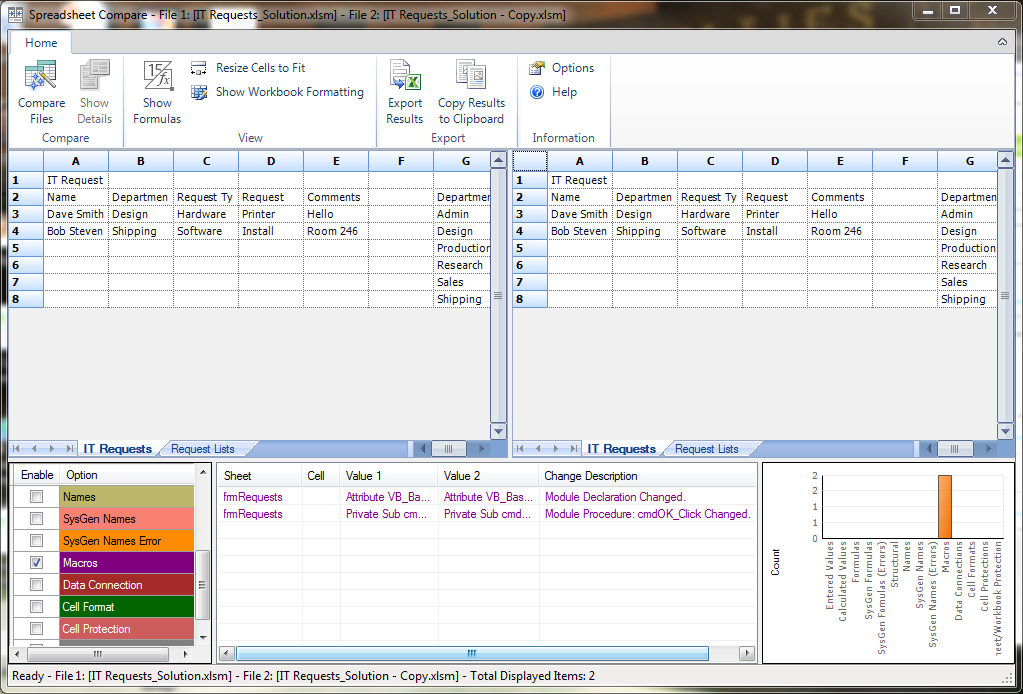 Simply point it in the direction of your two files, ensure the Macros box is checked and let it do its magic. You’ll get a list of procedures that have changed along with the text output. It still doesn’t drill down to every specific character but in a complex project it will get you closer to what’s happened.
How to: Enable the Add-in through File > Options > Add-Ins, from the Manage drop-down choose COM Add-Ins > Go. Tick Inquire and click OK.
To use it select the Inquire Tab in Ribbon > Compare Files. Browse to your files and click OK.
For training on Excel VBA 2013 and other versions, browse Excel VBA training courses from Best STL, available London and UK wide.
