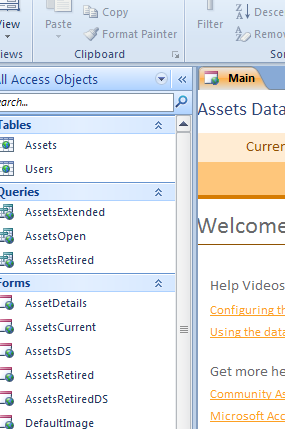
Microsoft Access is a relational database system. That simply means that in the one file you can have multiple tables, forms, queries, and reports. It is pretty much like when you were back in junior high school and you kept all of your notes in a three-ringed binder with different sections for each of your individual classes. Access has a navigation pane on the left side that acts as a separator of each type of object. .
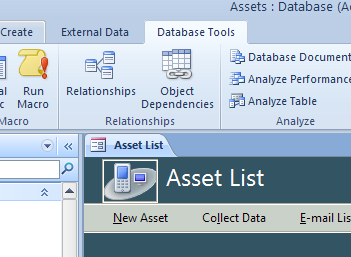 You can have many different tables in the same file; but if you need to get information from more than one table at the same time, you need to create a join between two tables. A join is simply a way to travel between the two tables. Think of the join line as a road used to travel between the two tables. While driving, you need to find a common intersection to be able to go onto the other road. Well, in joining tables, you need to have a common field to create the join. A common field is nothing more than the same field in the two separate tables. Let’s take a look at this. We have two tables that we are going to use as an example. We want to be able to get a list of all of the departments and the employees that are in those departments. To get to the relationship window, you go to the Database Tools ribbon and click on Relationships.
You may need to select the tables that you want to join. That brings up the dialog box that allows you to select the two tables that you need to join. Now simply select your tables.
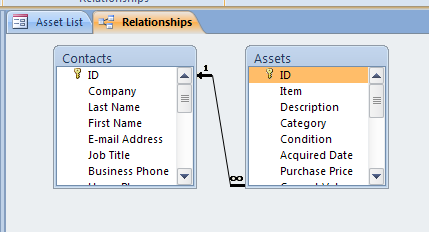 Once you have selected your tables, close the Show Table dialog box. You may need to resize the table information so that you can see the fields in each table. For this example, we are using the Department table and the Employees table.
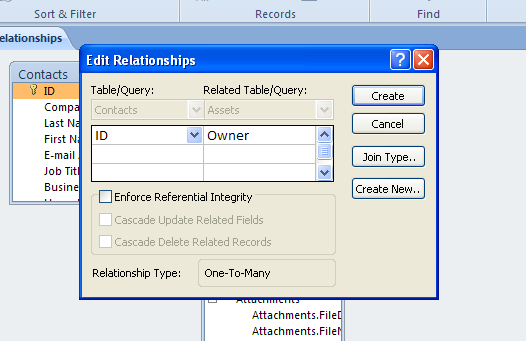 Now comes the easiest part! Simply drag the field of DeptCode from the tblDepartments where it is the primary key field over the field of DeptCode in the tblEmployees where it is the foreign key field. Now what comes up is this dialog box. Put a checkmark in Enforce Referential Integrity and I always like to Cascade Update Related Fields and now simply click the Create command button. You have now just created the join between these two tables and anytime you use these two tables in any query, the join line will be there.
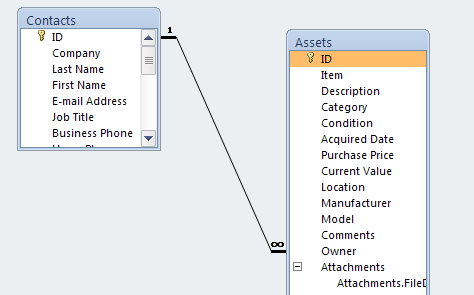 All that is left to do is to close out of the Relationship window by clicking the close button and now you can create your queries pulling any information from either table. These tables will stay joined until you decide to delete this relationship. Creating join lines in Microsoft Access really is this simple!
